
Monday, 11 October 2010

Sunday, 10 October 2010
FINAL IMAGES FOR SCHOOL MAGAZINE!
To create my contents page I used QuarkExpress.
Here are my screen grabs of my development in creating my contents.


Here, I added my main images next to the numbers I inserted.
 After adding my images I then included all my articles in the "Features" and "Regulars".
 After importing my picture into Photoshop, I used the Polygonal Lasso Tool to cut around my main image.
 I then added my masthead- "SchoolChat" using the text tool and chosing my colour and font. I also added my main cover line- "WelcomeBack! Outstanding Results" across my main image. After, I imported a picture of a bar code and situated it at the bottem corner of my cover.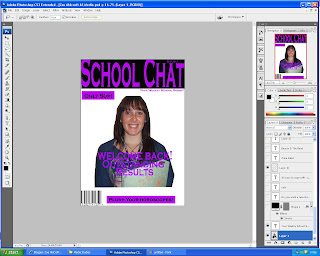
 Finally, I added my coverlines using the text tool and different colours. I then posisioned my coverlines on the sides of my front cover.
Here are my screen grabs of my development in creating my contents.

Here, i opened up QuarkExpress and added my headline- "Contents" and numbers of where my main images will be situated.

Then, I added two sublines "Features" and "Regulars".
 |
 After adding my images I then included all my articles in the "Features" and "Regulars".
To create my front cover of my school magazine, I used a programe called Photoshop to help design my media product.
 After importing my picture into Photoshop, I used the Polygonal Lasso Tool to cut around my main image.
 I then added my masthead- "SchoolChat" using the text tool and chosing my colour and font. I also added my main cover line- "WelcomeBack! Outstanding Results" across my main image. After, I imported a picture of a bar code and situated it at the bottem corner of my cover.
 I then added two buzz words using the rectangle tool to create two coloured rectangles. Then I added a text to the rectangles- "Only 50p" and "Plus Your Horoscopes".

 Finally, I added my coverlines using the text tool and different colours. I then posisioned my coverlines on the sides of my front cover.
Saturday, 9 October 2010
PHOTOGRAPHS FOR SCHOOL MAGAZINE!
For my magazine, i had to collect some images so that they would be included on my front cover and in my contents!:
 |
| This picture is going to be used for my main image of my front cover! |
 |
| This picture will be used to show one of my featured articles in my contents- "Welcoming new students". |
 |
| This picture will be used for one of my regular artifcles in my contents- "Students of the Month". |
 |
| This picture is going to be used as a featured article in my contents- "RESULTS!" |
 |
| This picture of my self will be used in my editors letter on the contnets page. |
Friday, 8 October 2010
ROUGH LAYOUT OF CONTENTS PAGE
 Again, after collecting all of my ideas for the contents page I designed a rough layout of what would be my contents page in my magazine:
PLANNING CONTENT!
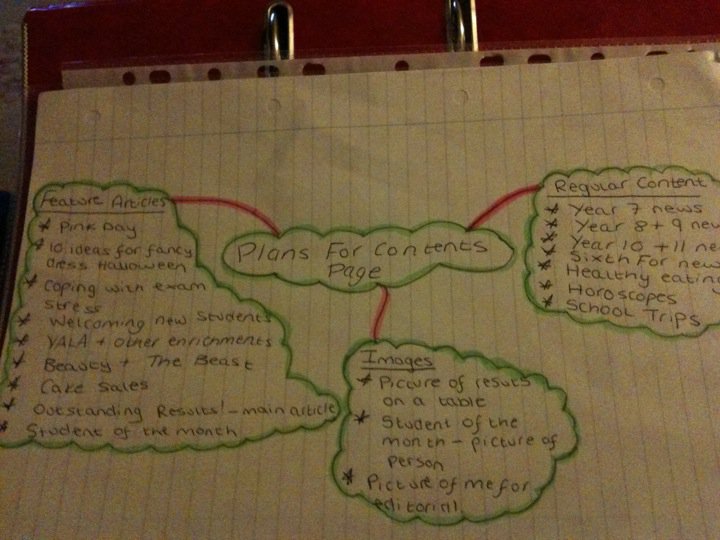
After designing my front cover, it was time to collect ideas for my contents page. I thought about what Featured and Regular articles that would be included:
FEATURE ARTICLES:
- Pink Day
- 10 ideas for fancy dress Halloween
- Coping with exam stress
- Welcoming new students!
- YALA+ other enrichments
- Beauty and the Beast
- Cake Sales
- Outstanding results- record breaking
- Stundents of the month
- Year 7 News
- Year 8+9 News
- Year 10+11 News
- Sixth Form News
- Healthy Eating
- Horoscopes
- School Trips
This is the mind map of all my ideas for my contents page collected that i did in class.

ROUGH LAYOUT OF FRONT COVER!
After collecting all of my ideas for my front cover, i then designed a front cover of what my final front cover would look like:

PLANS FOR FRONT COVER!
TITLE FOR NEW SCHOOL MAGAZINE: School-Chat
MAIN IMAGE: Picture of a sixth former
MAIN ARTICLE: "Outstanding Exam results!"COVER LINES
- New Uniform
- Beauty And The Beast audition success
- YALA- do you want to learn a new skill?
- Welcoming new students
- Cake sales
- 10 ways in coping with exam stress


 |
Subscribe to:
Posts (Atom)